Design & Technology
Studying Design and Technology is a valuable foundation for future careers and further study. Developing students' skills. Core knowledge gained from Year 7 through to Year 11 involves learning about new and emerging technologies, developments in new materials, mechanical devices and materials and their working properties. There is a range of technical knowledge throughout the Key Stages, from selection of materials or components, using and working with materials, specialist techniques and processes and surface treatments and finishes.
Student resources
The Google Drive, Google Site and Clickview are only available for students and teachers of Aylesbury High School. The Google Drive and Site contain all Google-based resources used in lessons.
The other quick links are to websites we subscribe to with extra resources. Students have their own login details given to them by the school.
| AHS only resources | Web based quick links |
|---|---|
|
|
|





Extension work & wider reading at Key Stage 3 (Years 7-9)
If you have finished all the work set on Google Classroom/in lessons very quickly and/or if you’re looking for Design Technology things to do to stop you getting bored, try out some of these suggestions.
Students have access to applications and software that can aid with improved understanding of Design and Technology. A lot of CAD software that is used in industry is free whilst students are in education, and it is beneficial for students to work on and improve their ability for GCSE/A level NEA and for future University courses or career choices.
Autodesk software (Laptop/desktop only)
-
Go to the Autodesk Education Community.
-
Sign in or create an account using your school credentials.
-
Verify your student or educator status through SheerID by providing proof of enrolment (such as a school-issued ID or enrolment document).
-
Once verified, download and install AutoCAD.
Onshape
Onshape runs entirely inside a web browser, making it fully compatible with Chromebooks without needing any heavy local software installation.
Focus E Learning
www.focuselearning.co.uk. Very useful range of applications.
Username and password is shared with students.
BBC microbit - Makecode
You can code a BBC micro:bit on a Chromebook using the browser-based Microsoft MakeCode Editor.
Extension work & wider reading at Key Stage 4 (Years 10-11)
If you finish all the work set on Google Classroom very quickly and/or if you’re looking for Design Technology things to do to stop you getting bored, try out some of these suggestions.
Students have access to applications and software that can aid with improved understanding of Design and Technology. A lot of CAD software that is used in industry is free whilst students are in education, and it is beneficial for students to work on and improve their ability for GCSE/A level NEA and for future University courses or career choices.
Autodesk software (Laptop/desktop only)
-
Go to the Autodesk Education Community.
-
Sign in or create an account using your school credentials.
-
Verify your student or educator status through SheerID by providing proof of enrollment (such as a school-issued ID or enrollment document).
-
Once verified, download and install AutoCAD.
Onshape
Onshape runs entirely inside a web browser, making it fully compatible with Chromebooks without needing any heavy local software installation.
Focus E Learning
www.focuselearning.co.uk. Very useful range of applications.
Username and password is shared with students.
BBC microbit - Makecode
You can code a BBC micro:bit on a Chromebook using the browser-based Microsoft MakeCode Editor.
Extension work & wider reading at Key Stage 5 (Years 12-13)
If you finish all the work set on Google Classroom very quickly and/or if you’re looking for Design Technology things to do to stop you getting bored, try out some of these suggestions. mendations
Students have access to applications and software that can aid with improved understanding of Design and Technology. A lot of CAD software that is used in industry is free whilst students are in education, and it is beneficial for students to work on and improve their ability for GCSE/A level NEA and for future University courses or career choices.
Autodesk software (Laptop/desktop only)
-
Go to the Autodesk Education Community.
-
Sign in or create an account using your school credentials.
-
Verify your student or educator status through SheerID by providing proof of enrolment (such as a school-issued ID or enrolment document).
-
Once verified, download and install AutoCAD.
Onshape
Onshape runs entirely inside a web browser, making it fully compatible with Chromebooks without needing any heavy local software installation.
Focus E Learning
www.focuselearning.co.uk. Very useful range of applications.
Username and password is shared with students
BBC microbit - Makecode
You can code a BBC micro:bit on a Chromebook using the browser-based Microsoft MakeCode Editor.
Subject intent
Key Stage 3
Year 7
- Setting a baseline of expectation of achievement from Key Stage 2.
- Build key skills in tools, equipment, processes and health and safety.
- Understand the design process.
- Be able to work and have knowledge of a range of materials.
- Produce a maze with accuracy. Students will learn basic tools and joining techniques as well as CAD.
- Produce a plaster magnet using creative skills and technical ability.
Year 8
- Students have had a broad introduction to Design and Technology.
- The intention now is to build on their subject knowledge of materials and manufacturing processes and allow students more independence in their design and eventual outcomes using prior knowledge and skills to produce a cardboard lamp.
- Students analyse and evaluate their progress in more detail to inform appropriate changes and modifications in their practice that could be used in their progression to Year 9.
Year 9
- Students now understand the use of CAD and how it can apply to a project. They use their knowledge of tools, processes and equipment with some skill and precision to produce a cardboard game of their choice.
- The students will learn further CAD processes that they can incorporate in their work. The students need to assess their work against a specification, (linking with requirements at GCSE and GCE).
- As an extension, the students work on a small set of mechanisms, problems and tasks to aid their understanding.
Key Stage 4
Year 10
- During the first term, the students improve their knowledge of a range of skills and practical processes using materials and techniques learnt during Key Stage 3.
- They also begin to produce more complex technical drawings and evaluate/assess the processes. This will incorporate perspective, isometric and orthographic drawing techniques.
- The students will build on their knowledge of electronic components which are more complex circuits than those produced in year 8. They will use the skills gained in soldering. They learn how to read a circuit schematic and use breadboards. The students also learn to program some of the circuits.
- The course progresses into building different mechanical and structural systems similar to those learnt during Key Stage 3 Physics and DT lessons.
- During the final half-term, the students will begin their NEA (the context sent by the examination board) with the aim of completing the first section for their first term back in Year 11.
Year 11
- Students complete the first research section of their NEA which then progresses to the design development and prototyping section during their first term.
- They then plan and work on their practical piece for the NEA.
- The practical aspect of the project incorporates mechanical and electronic parts.
- Through modelling and testing, they build a final working prototype showing an understanding of its workings and the systems used. This will then be tested against the original specification and expectation.
- The students use knowledge gained through Key Stage 3 and Year 10 activities to produce this piece. They will also spend time learning the theoretical knowledge required through practice examination questions and activities.
- The knowledge gained in the NEA and the theory of materials and manufacturing will give the students a good grounding if they progress to A level.
Key Stage 5
Year 12
- Building on knowledge and skills gained at Key Stage 3 and Key Stage 4 (for students from AHS, outside applicants checking prior attainment). Students build on their skills and knowledge base. There are high expectations of quality and detail early on in the course.
- Working from the OCR examination board specification, students carry out a range of research tasks and activities that are reinforced through practical tasks and small focused projects.
- Students are prepared for the examination format through regular practice of exam questions that are then reviewed for understanding to ensure they are confident with the contents.
- During the final half term, the students will begin their NEA (the context chosen by themselves) with the aim of completing the first section for their first term back in Year 13.
Year 13
- In Year 13, the focus is predominantly on the NEA allowing students to produce a body of work that is context lead working closely with a client. The purpose of this is to demonstrate their understanding of both theory and manufacturing process evidenced as a practical outcome/working prototype. This will also enable the students to build a portfolio of work that they could use during interviews at a university.
- In addition, students are given practice exam-style questions and preparation for the written paper and review and revise theoretical content. This theoretical knowledge delves deeper into the materials and manufacturing methods used in industry and develops more of a working knowledge of the processes including CAD/CAM and automation.
Key Stage 3 (Years 7-9) course implementation, learning journey & attainment.
Course content
| Year 7 | Year 8 | Year 9 |
|---|---|---|
|
|
|
Learning Journey
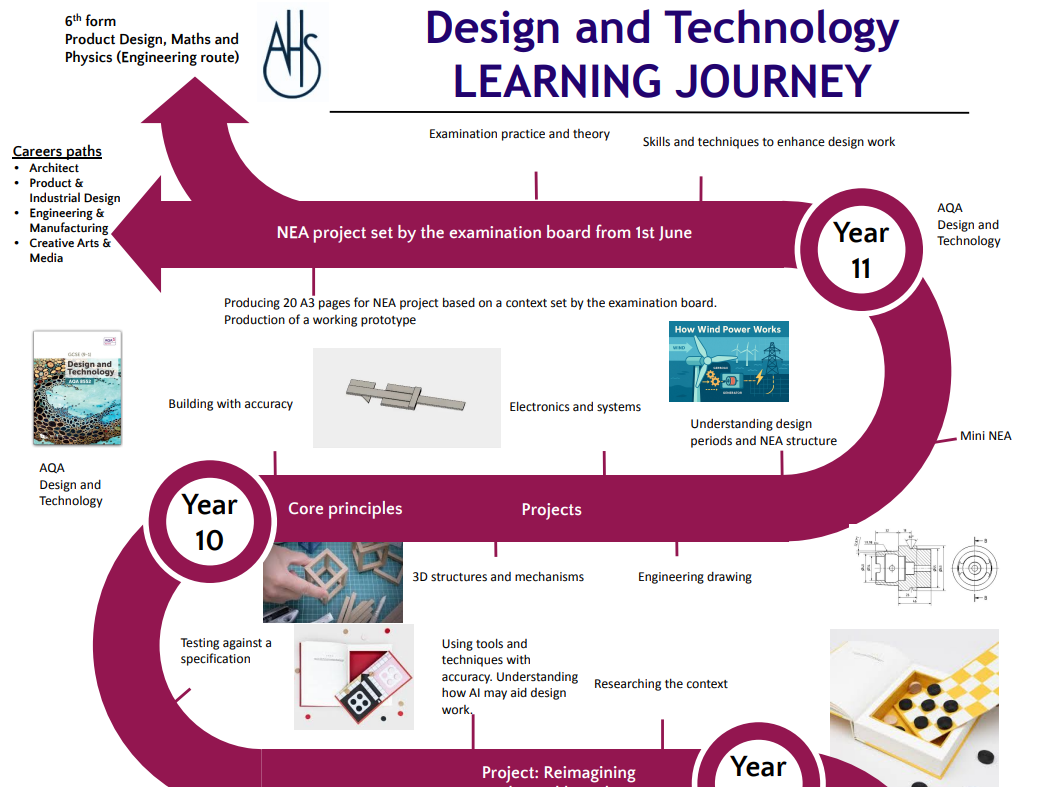
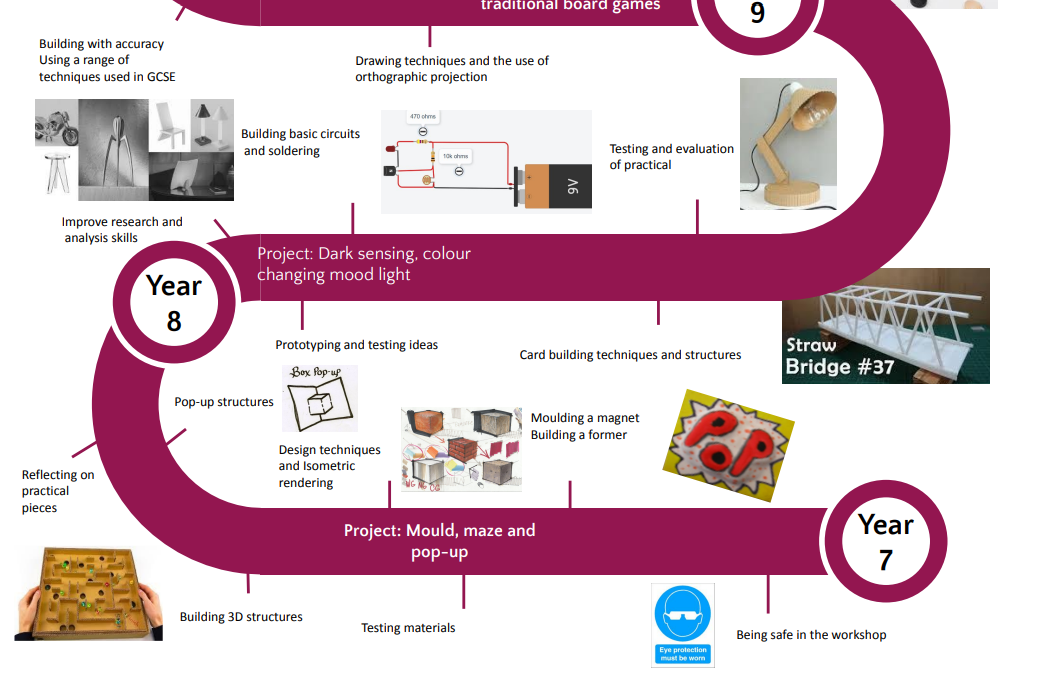
The skills at Key Stage 3 are split into 4 key areas.
- Research and analysis
- Design development
- Practical and planning
- Testing and evaluation
Each of these skills is then subdivided to fit into the WT/WA/WB system.
Key Stage 3 attainment descriptors
Research, analysis & Design development
Working Towards
| Use of images | Explanation in research | Annotation of images | Presentation and communication |
|---|---|---|---|
|
|
|
|
Working At
| Use of images | Explanation in research | Annotation of images | Presentation and communication |
|---|---|---|---|
|
|
|
|
Working Beyond
| Use of images | Explanation in research | Annotation of images | Presentation and communication |
|---|---|---|---|
|
|
|
|
Practical and planning
Working Towards
| Success criteria |
|---|
|
Working At
| Success criteria |
|---|
|
Working Beyond
| Success criteria |
|---|
|
Testing and evaluation
Working Towards
| Success criteria |
|---|
|
Working At
| Success criteria |
|---|
|
Working Beyond
|
Success criteria |
|---|
|
Key Stage 4 (Years 10-11) course implementation, learning journey & assessment info.
Course content
| Year 10 | Year 11 |
|---|---|
|
|
Learning journey
This link takes you to the AQA specification for Design Technology, which contains all the necessary course information. Assessments take place throughout the 2 years of the course, in addition to Year 10 exams and mocks in the spring term of Year 11.
How will I be assessed?
| Paper 1 50% | NEA 50% |
|---|---|
|
Written exam – 2hrs
|
Internally assessed and externally moderated Substantial design and make task Assessment criteria:
|
Key Stage 5 (Years 12-13) course implementation, learning journey & assessment info.
Course content
(Taught at AGS)
| Year 12 | Year 13 |
|---|---|
|
|
This link takes you to the OCR specification for Design Technology, which contains all the necessary course information. Assessments take place throughout the 2 years of the course, in addition to Year 12 exams and mocks in the spring term of Year 13.
How will I be assessed?
| Component 1 26.7% | Component 2 23.3% | Component 3 50% |
|---|---|---|
|
Principles of Design Technology Written exam – 1 hr 30 mins
|
Problem-solving in Design Technology Written exam – 1 hr 45 mins
|
Iterative design project NEA Internally assessed and externally moderated Approx. 65 hours |
Subject impact
Key Stage 3
Students in year 7 are given health and safety advice on tools, materials and machines used. This is based on, hopefully, prior knowledge, but we have found it best to teach these to each group as machines, tools and materials are used. Students in year 7 are charged for the material costs for the projects produced during Key stage 3. This helps to ensure the department can pay for not only the necessary materials but the renewed equipment required. This has already had a very big impact, ensuring that we have whole class amounts of some of the tools required by each student. Year 7, 8 and 9 produce exciting and original results to the projects each year.
Key Stage 4
GCSE Design and Technology is a popular subject with good group numbers. A wide range of tools and equipment are taught to the students. The specification is taught primarily at GCSE by one member of staff. The teaching and practical materials change each year to experiment with new technologies and equipment. This is based on how things work with group sizes and availability of equipment and machines required. The students have achieved some excellent results.
Key Stage 5
OCR Design and Technology
(taught at AGS)
Students gain knowledge of the specification. New techniques for manufacturing are taught during this period that they would not have done during key stage 3 or 4 which enable more complicated and creative design work. Students have often chosen a context for their NEA which is linked to their desired course at university. Many of the past students have gone onto Engineering and Design courses at university.
Feedback in Design Technology lessons
This chart explains the types of feedback that students can expect to receive for work done in language lessons/at home.
| Activity | Types of feedback |
|---|---|
|
Key Stage 3 assessment fortnightly homework. |
Assessed in 4 sections. Research and analysis, design and development, planning and practical and evaluation. Work is checked each week and assessed twice with feedback on sections over the term. |
| Practical work | Group assessment once completed. |
| Key Stage 4 and Key Stage 5 NEA and examination practice each week | Exam papers and techniques are assessed each week. Papers are marked by the teacher and peer assessment. NEA sections are checked for completion every 6 weeks after each section. |
School values in Design Technology
| Boundless Aspiration | Curious Engagement | Resilient Bravery | Selfless Generosity |
|---|---|---|---|
|
|
|
|
