Skip to content
  • Computing

    The Computing curriculum develops students to use computational thinking and creativity to understand and change the world. Computing is deeply linked with mathematics, science, and design technology, and builds strong analytical and problem-solving skills.

    The core of computing is computer science, in which pupils are taught the principles of information and computation, how digital systems work, and how to put this knowledge to use through programming. Building on this knowledge and understanding, pupils are equipped to use information technology to create programs, systems and a range of content. Computing also ensures that pupils become digitally literate – able to use, and express themselves and develop their ideas through information and communication technology – at a level suitable for the future workplace and as active participants in a digital world.

    Student resources

    The Google Drive, Google Site and Clickview are only available for students and teachers of Aylesbury High School. The Google Drive and Google Site contain all Google-based resources used in lessons. 

    The other quick links are to websites we subscribe to with extra resources. Students have their own login details given to them by the school. 

    AHS only resources Web based quick links

    Web based quick links

    Extension work & wider reading at Key Stage 3 (Years 7-9)

    If you have finished all the work set on Google Classroom/in lessons very quickly and/or if you’re looking for Computing  things to do to stop you getting bored, try out some of these suggestions. 

    Programming Skills

    Small basic  You can practice and build your SmallBasic programming skills further on the SmallBasic website. This will work on your Chromebook. You will find lots of tutorials on here to explore SmallBasic further.

    TuringLab This is ideal for beginning to learn python. This series of courses takes learners from absolute beginner to understanding core concepts such as sequence, selection, iteration, functions and more.

    Code Combat Learn to code in python through play and play the Kithgard Dungeon. 

    You can try more challenges here:

    Hour of Code - Goblins 'n' Glory 0/7

    Mission Encodable Once you have mastered the basics of Python this is a great site for building your skills further. Mission Encodable is a free project-based website with creative and engaging coding tutorials.

    Programiz Practice python programming on your chromebook

    Code Breaking and Cryptography

    Courses and Resources | National Cyber Security Centre - Explore the CyberFirst knowledge nuggets 

    Crypto Corner explores how a variety of codes and ciphers work, how to use them to both encrypt and decrypt a message, and how to use methods to help break a code that you have intercepted.

    15 Interesting Ciphers And Secret Codes For Kids To Learn

    Cyber Security  

    CyberFirst Navigators | National Cyber Security Centre Learn more about cyber security from the National Cyber Security Centre

    CSC Cybergames – Cyber Games UK a selection of interactive resources and games that aim to introduce you to different aspects of Cyber Security.

    Game Development

    A Newbie Guide to pygame Investigate pygame – using python to create games

    Game development with Pygame This playlist will introduce you to creating games with pygame

    Website development

    Mission Encodeable Web Development Tutorials an introduction to html and css

    HTML Tutorial Build your html skills further

    CSS Tutorial  Learn how to use CSS

    Data Representation

    Binary Game practice your binary conversion skills

    Flippy Bit And The Attack Of The Hexadecimals From Base 16 practice your hexadecimal conversion skills

    Extension work & wider reading at Key Stage 4 (Years 10-11)

    If you finish all the work set on Google Classroom very quickly and/or if you’re looking for Computing things to do to stop you getting bored, try out some of these suggestions.

    Programming

    Mission Encodeable Mission Encodeable is a free, student-led platform that teaches you how to code with creative and engaging coding tutorials

    Python Step By Step From GoCodeIt From basic commands through to advanced data structures. Learn Python with GoCode It.

    Computing concepts

    AQA GCSE - Craig 'n' Dave video resources tailored to the AQA GCSE specification

    Computer Science Revision - PMT Past papers, notes, flashcards, videos by topic for AQA GCSE

    SQL Tutorial  Learn SQL

    Code Bash Free interactive Computer Science tools including Logic Gates, Algorithms and SQL

    Further Reading

    Learning python

    GCSE Computer Science exam practice programming questions for AQA

    Andy Storey ISBN 979-8310252585  

    Python Challenge!

    PM Heathcote ISBN: 9781910523353

    Extension work & wider reading at Key Stage 5 (Years 12-13)

    If you finish all the work set on Google Classroom very quickly and/or if you’re looking for Computing things to do to stop you getting bored, try out some of these suggestions. 

    Programming

    Mission Encodeable Python tutorials from basics through to OOP and APIs with Python

    Python Step By Step From GoCodeIt From basic commands through to advanced data structures. Learn Python with GoCode It.

    Python Tutorial 

    Computing Concepts

    AQA A Level - Craig 'n' Dave video resources tailored to the AQA GCSE specification

    Computer Science Revision - PMT Past papers, notes, flashcards, videos by topic for AQA A Level

    Students — Ada Computer Science Aligned to the AQA specification. Great for independent study. Includes over 65 learning topics. From computing systems and networks, to AI, machine learning, and much more.

    Code Bash Free interactive Computer Science tools including Logic Gates, Boolean Algebra Algorithms and SQL 

    Further Programming projects

    A Newbie Guide to pygame Investigate pygame – using python to create games

    Game development with Pygame This playlist will introduce you to creating games with pygame

    Flask Tutorial - GeeksforGeeks This tutorial will introduce you to Flask, a lightweight web framework used to build web applications

    Cryptography - 101 Computing Cryptography-based computing coding challenges


    Subject intent

    Key Stage 3

    Key stage 3 lessons are designed to empower students and enable them to become confident individuals, effective contributors and successful learners. 

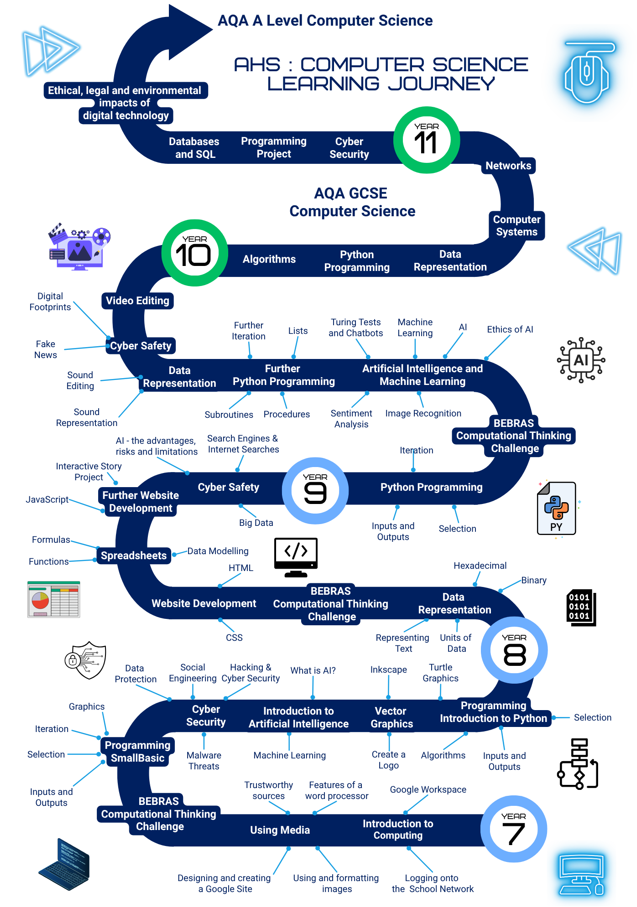
    Year 7 begins with an introduction to Google Workspace and the school network. Students then move on to the ‘Using Media’ unit to develop their understanding of information technology and digital literacy. They will apply the skills learnt throughout the unit to create a Google Site about a real-world cause they are passionate about. During this process, they will develop software formatting skills and explore the ethical and legal concerns surrounding the use of others’ work, including licencing.

    Next, they will learn to program in Small Basic, a text-based language. This unit introduces fundamental concepts such as variables, data types, sequence, selection, and iteration. Following this, students will design vector graphics using Inkscape.

    The curriculum then moves into cyber security, where students will examine the techniques cybercriminals use to steal data, disrupt systems and infiltrate networks. After considering the value of their personal data and how organisations use it, they will learn about social engineering and common cybercrimes before investigating methods of protection. Finally, students will be introduced to Python programming, an industry standard programming language, building upon the foundations established in the Small Basic unit.

    Year 8 commences with Data Representation, a fundamental principle of Computer Science that explores how computers use binary to process information and the hexadecimal number system. Students will then develop technical skills in HTML and CSS to construct well-structured websites. These web development skills are revisited later in the year, allowing students to consolidate their skills by developing an 'interactive story' website.

    The students then move on to Data Analysis, where they learn how to use spreadsheets to analyse and manipulate data, a vital skill set for both the wider curriculum and the modern workplace. Finally, students explore issues in Digital Ethics and Cyber Safety. They will examine data privacy and the 'Big Data' phenomenon, alongside the ethical implications, risks, and responsibilities associated with the rapid advancement of Artificial Intelligence (AI)


    Year 9 begins by learning further Python programming skills. They will revisit this topic during the year and develop their programming skills to a point where they are ready to transition to GCSE Computer Science, should students wish to take the subject in Year 10. Additionally, it will provide students with a solid foundation in programming for future careers.  

    Students will gain an in-depth insight into Artificial Intelligence and Machine Learning, including applications of AI and an introduction to Machine Learning. They will have the opportunity to develop AI programs such as a simple image recognition system, a virtual assistant and a sentiment analysis system. As this is a fast moving area of development, the ethical implications of AI are examined.

    Pupils will explore the Data Representation topic further, gaining an understanding of representing sound digitally, using sound editing software to manipulate sound. 

    They will also build Digital Literacy skills, including how to recognise Fake News, Misinformation and Disinformation and explore factors affecting Online Reputations.

    All students in Years 7, 8 and 9 will also have the opportunity to participate in the BEBRAS Computational Thinking Challenge.

    Key Stage 4

    Pupils in Year 10 begin their GCSE course by developing their python programming skills further and building their understanding of algorithms and computational thinking. This will include: computational thinking, code tracing, problem-solving, programming concepts including the design of effective algorithms and the designing, writing, testing and refining of code. They will continue to develop these skills over the course of Year 10 and into Year 11. 

    At the end of Year 10 and start of Year 11, they will have the opportunity to complete an extended programming task where they will design, write, test and refine program code for a given computational problem. This will prepare them for their Paper 1: Computational thinking and programming skills examination in Year 11. 

    In parallel to this, they will develop their knowledge of Computing concepts in line with the AQA (8525) specification, including. The course topics will be taught in parallel as shown below:

    Key Stage 5

    Pupils in Key Stage 5 begin with programming, revisiting first programming principles and then deepening their knowledge by studying further programming concepts including recursion, file handling, exception handling and Object-Oriented Programming (OOP). In parallel to this, they will start by learning the theory behind data representation and computer systems. 

    Key Stage 3 (Years 7-9) course implementation, learning journey & attainment.

    Course content

    Year 7 Year 8 Year 9
    • Introduction to Google Workspace and the school network

    • Word processing skills

    • Identifying appropriate images, Copyright and Creative Commons

    • Identifying the credibility of sources on the internet

    • Creating a Google Site to promote a cause

    • Introduction to Small Basic Programming

    • Introduction to Cyber Security 

    • AI fundamentals – what is AI, understanding bias

    • Media - vector graphics

    • Introduction to Python programming

    • Data Representation: The binary number system, hexadecimal, representing text and images

    • Web development skills: HTML/ CSS

    • Spreadsheets

    • HTML ‘Interactive Story’ project

    • Digital Ethics and Cyber Safety

    • Understanding the limitations and risks of Artificial Intelligence and the importance of using it safely

    • Python Programming: Variables, Data Types, Inputs/ Outputs, Selection, Iteration

    • AI and Machine Learning: applications of AI, machine learning, building AI programmes and the ethical implications of AI

    • Further Python Programming: Iteration, Arrays (lists), Subroutines

    • Data Representation: representing sound and sound editing

    • Digital Literacy – identifying fake news and online reputation

    Learning Journey


    Year 7 attainment descriptors

    At Key Stage 3, we focus on 3 key areas of computing competence across all 3 year groups.

    Working Towards
    Programming Digital Literacy Computing concepts
    • Completes most of the programming tasks set.
    • Writes simple programs independently using inputs and outputs and variables.
    • Detects and corrects common syntax errors.
    • Completes most of the tasks set.
    • Uses a variety of software to manipulate and present digital content. 
    • Recognises responsible use of technologies and online services, and knows a range of ways to report concerns. 
    • Understands how to use computers safely and responsibly, including physical health and well-being. 
    • Understands some of the legal, moral and ethical issues associated with technology. 
    • Understands some of the potential threats to an IT system and can suggest some different methods to mitigate these risks.
    • Completes most of the tasks set.
    • Demonstrates an understanding of Computing technical terminology.
    • Make simple, correct statements about a topic.
    Working At
    Programming Digital Literacy Computing concepts
    • Completes all the programming tasks set.
    • Understands that programs execute by following a sequence of instructions, selection and iteration.
    • It uses arithmetic operators, IF/ELSE statements and Definite/Indefinite loops. 
    • Understands further programming concepts such as lists and subroutines.
    • Uses logical reasoning to predict the behaviour of programs.
    • Detects and corrects syntax and common logic errors.
    • Uses variables effectively in code.
    • Completes all the tasks set.
    • Creates digital content to achieve a given goal through combining software packages independently. 
    • Demonstrates responsible use of technologies and online services, and knows a range of ways to report concerns. 
    • Demonstrates use of computers safely and responsibly, including physical health and well-being. 
    • Understands the legal, moral and ethical issues associated with technology. 
    • Understands the potential threats to an IT system and can suggest different methods to mitigate these risks. 
    • Completes all the tasks set.
    • Can describe Computing Concepts using technical terminology.
    • Applies understanding of Computing Concepts to provide a solution to a given problem.
    Working Beyond
    Programming Digital Literacy Computing concepts
    • Completes all the programming tasks set independently and challenges themselves to complete the extension activities.
    • Understands that programs execute by following a sequence of instructions, selection and iteration.
    • Uses arithmetic operators, complex IF/ELSE statements and Definite/Indefinite loops using more complex boolean expressions. 
    • Understands further programming concepts such as lists and subroutines.
    • Uses lists and subroutines in programs.
    • Uses logical reasoning to predict the behaviour of complex programs.
    • Detects and corrects syntax and complex logic errors independently.
    • Uses variables effectively in code.
    • Can independently design and code additional features that extend their programs beyond the set task.
    • Completes all the tasks set independently and works through the extension tasks
    • Independently uses a wide variety of software to manipulate and present digital content independently, using tools and features efficiently. 
    • Demonstrates use of computers safely and responsibly,
    • including physical health and well-being.
    • Recognises what is acceptable and unacceptable behaviour
    • when using technologies and online services and demonstrates
    • responsible use of technologies and online services.
    • Understands the legal, moral and ethical issues associated with technology and uses resources independently to deepen their knowledge.
    • Understands a wide range of potential threats to an IT system
    • and can suggest appropriate methods to mitigate these risks.
    • Completes all the tasks set, including the extension tasks.
    • Can describe Computing Concepts in depth using technical terminology.
    • Applies understanding of Computing Concepts to provide a solution to a complex problem.
    • Ask questions if you are finding a concept tricky. This could help those around you who may also be finding a concept challenging

    Year 8 attainment descriptors

    At Key Stage 3, we focus on 3 key areas of computing competence across all 3 year groups.

    Working Towards
    Website design & development Digital Literacy Computing concepts
    • Completes most of the practical tasks set.
    • Writes simple HTML pages independently using basic html tags and simple formatting.
    • Detects and corrects common errors.
    • Completes most of the tasks set.
    • Spreadsheets
    • Can navigate a spreadsheet, locate specific cell references, and enter basic data.
    • Can edit existing data and apply basic formatting to improve visual layout with guidance.
    • Can write simple manual mathematical formulas using cell references and basic arithmetic operators (e.g., =A1+B1).
    • Cyber Safety
    • Understands how to use computers safely and responsibly, including physical health and well-being. 
    • Understands some of the legal, moral and ethical issues associated with technology. 
    • Completes most of the tasks set.
    • Demonstrates an understanding of Computing technical terminology.
    • Make simple, correct statements about a topic.
    Working At
    Website design & development Digital Literacy Computing concepts
    • Completes all the practical tasks set.
    • Writes simple HTML pages independently using a range of html tags, css styling techniques and basic JavaScript.
    • Completes all the tasks set.
    • Spreadsheets
    • Independently formats cells appropriately according to data types and uses formatting tools effectively.
    • Correctly selects and applies fundamental spreadsheet functions, including across appropriate cell ranges.
    • Uses simple conditional formatting techniques.
    • Creates clear and appropriate charts to represent data. 
    • Cyber Safety
    • Demonstrates use of computers safely and responsibly, including physical health and well-being. 
    • Understands the legal, moral and ethical issues associated with technology. 
    • Understands the potential threats to an IT system and can suggest different methods to mitigate these risks. 
    • Completes all the tasks set.
    • Can describe Computing Concepts using technical terminology.
    • Applies understanding of Computing Concepts to provide a solution to a given problem.
    Working Beyond
    Website design & development Digital Literacy Computing concepts
    • Completes all the practical tasks set independently and challenges themselves to complete the extension activities.
    • Writes simple HTML pages independently using a wide range of html tags, css styling techniques and JavaScript, including some that have been investigated independently.
    • Detects and corrects errors independently.
    • Can independently design and code additional features that extend their websites beyond the set task.
    • Completes all the tasks set independently and works through the extension tasks
    • Spreadsheets
    • Independently formats cells appropriately according to data types and uses a wide range of formatting tools effectively.
    • Confidently applies conditional formatting techniques.
    • Correctly selects and applies further functions across appropriate cell ranges.
    • Creates clear and appropriate charts with suitable titles and labelled axes to represent data.
    • Cyber Safety
    • Demonstrates use of computers safely and responsibly,
    • including physical health and well-being.
    • Recognises what is acceptable and unacceptable behaviour
    • when using technologies and online services and demonstrates
    • responsible use of technologies and online services.
    • Understands the legal, moral and ethical issues associated with technology and uses resources independently to deepen their knowledge.
    • Understands a wide range of potential threats to an IT system
    • and can suggest appropriate methods to mitigate these risks.
    • Completes all the tasks set, including the extension tasks.
    • Can describe Computing Concepts in depth using technical terminology.
    • Applies understanding of Computing Concepts to provide a solution to a complex problem.
    • Ask questions if you are finding a concept tricky. This could help those around you who may also be finding a concept challenging

    Year 9 attainment descriptors

    At Key Stage 3, we focus on 3 key areas of computing competence across all 3 year groups.

    Working Towards
    Programming Digital Literacy Computing concepts
    • Completes most of the programming tasks set.
    • Writes simple programs independently using inputs and outputs and variables.
    • Detects and corrects common syntax errors.
    • Completes most of the tasks set.
    • Uses a variety of software to manipulate and present digital content. 
    • Recognises responsible use of technologies and online services, and knows a range of ways to report concerns. 
    • Understands how to use computers safely and responsibly, including physical health and well-being. 
    • Understands some of the legal, moral and ethical issues associated with technology. 
    • Understands some of the potential threats to an IT system and can suggest some different methods to mitigate these risks.
    • Completes most of the tasks set.
    • Demonstrates an understanding of Computing technical terminology.
    • Make simple, correct statements about a topic.
    Working At
    Programming Digital Literacy Computing concepts
    • Completes all the programming tasks set.
    • Understands that programs execute by following a sequence of instructions, selection and iteration.
    • Uses arithmetic operators, IF/ELSE statements and Definite/Indefinite loops. 
    • Understands further programming concepts such as lists and subroutines.
    • Uses logical reasoning to predict the behaviour of programs.
    • Detects and corrects syntax and common logic errors.
    • Uses variables effectively in code.
    • Completes all the tasks set.
    • Creates digital content to achieve a given goal through combining software packages independently. 
    • Demonstrates responsible use of technologies and online services, and knows a range of ways to report concerns. 
    • Demonstrates use of computers safely and responsibly, including physical health and well-being. 
    • Understands the legal, moral and ethical issues associated with technology. 
    • Understands the potential threats to an IT system and can suggest different methods to mitigate these risks. 
    • Completes all the tasks set.
    • Can describe Computing Concepts using technical terminology.
    • Applies understanding of Computing Concepts to provide a solution to a given problem.
    Working Beyond
    Programming Digital Literacy Computing concepts
    • Completes all the programming tasks set independently and challenges themselves to complete the extension activities.
    • Understands that programs execute by following a sequence of instructions, selection and iteration.
    • Uses arithmetic operators, complex IF/ELSE statements and Definite/Indefinite loops using more complex boolean expressions. 
    • Understands further programming concepts such as lists and subroutines.
    • Uses lists and subroutines in programs.
    • Uses logical reasoning to predict the behaviour of complex programs.
    • Detects and corrects syntax and complex logic errors independently.
    • Uses variables effectively in code.
    • Can independently design and code additional features that extend their programs beyond the set task.
    • Completes all the tasks set independently and works through the extension tasks
    • Independently uses a wide variety of software to manipulate and present digital content independently, using tools and features efficiently. 
    • Demonstrates use of computers safely and responsibly,
    • including physical health and well-being.
    • Recognises what is acceptable and unacceptable behaviour
    • when using technologies and online services and demonstrates
    • responsible use of technologies and online services.
    • Understands the legal, moral and ethical issues associated with technology and uses resources independently to deepen their knowledge.
    • Understands a wide range of potential threats to an IT system
    • and can suggest appropriate methods to mitigate these risks.
    • Completes all the tasks set, including the extension tasks.
    • Can describe Computing Concepts in depth using technical terminology.
    • Applies understanding of Computing Concepts to provide a solution to a complex problem.
    • Ask questions if you are finding a concept tricky. This could help those around you who may also be finding a concept challenging
         

    Key Stage 4 (Years 10-11) course implementation, learning journey & assessment info.

    Course content

    Year 10 Year 11
    • Fundamentals of algorithms 
    • Python Programming
    • Data Representation 
    • Computer systems
    • Networks
    • Databases and SQL
    • Ethical, legal and environmental impacts of digital technology on wider society, including issues of privacy
    • Cyber security

    Learning journey

    This link takes you to the AQA specification, which contains all the necessary course information. Assessments take place throughout the 2 years of the course, in addition to Year 10 exams and mocks in the spring term of Year 11. 

    How will I be assessed?

    Paper 1: Computational thinking and programming skills - 50% Paper 2: Computing concepts - 50%

    Written exam – 2hrs

    • Fundamentals of algorithms
    • Programming


    • A mix of multiple choice, short answer and longer answer questions assessing programming, practical problem-solving and computational thinking skills.

    Written exam – 1 hr 45 mins

    • Fundamentals of data representation
    • Computer systems
    • Fundamentals of computer networks
    • Cyber security
    • Relational databases and structured query language (SQL)
    • Ethical, legal and environmental impacts of digital technology on wider society, including issues of privacy


    • A mix of multiple choice, short answer, longer answer and extended response questions assessing SQL programming skills and theoretical knowledge.

    Key Stage 5 (Years 12-13) course implementation, learning journey & assessment info.

    Course content

    Year 12 Year 13
    • Fundamentals of programming 
    • Fundamentals of algorithms: Searching and Sorting algorithms 
    • We will return to the remaining topics in this unit later in the course
    • Problem-Solving and Theory of Computation 
    • Programming Paradigms: Procedural-oriented programming & Object-oriented programming
    • We will return to the remaining topics in this unit later in the course
    • Data Structures 
    • Fundamentals of algorithms: Recursive Algorithms, Big O Notation, Tracing Algorithms, Graph Traversal Algorithms, Optimisation Algorithms 
    • Limits of Computation 
    • Fundamentals of databases 
    • Further Programming Skills 
    • Regular Languages 
    • Non-exam assessment (NEA) – Introduce and commence the Programming Project
    • Data Representation 
    • Fundamentals of computer systems  
    • Fundamentals of computer organisation and architecture 
    • Networking 
    • The Skeleton code study
    • At the start of Year 13 students will be issued with Preliminary Material for the final Paper 1 exam, a Skeleton Program.
    • Programming Paradigms: Functional programming 
    • Consequences of uses of computing
    • NEA Programming Project
    • The Internet


    Learning journey

    This link takes you to the AQA specification, which contains all the necessary course information. Assessments take place throughout the 2 years of the course, in addition to Year 12 exams and mocks in the spring term of Year 13. 

    How will I be assessed?

    Paper 1 40% Paper 2 40% NEA 20%

     On-screen exam – 2hrs

    This paper tests a student's ability to program, as well as their theoretical

    knowledge of Computer Science:

    • Fundamentals of programming 

    • Fundamentals of data structures 

    • Fundamentals of algorithms 

    • Theory of computation

    • Systematic approach to problem-solving

    A mix of multiple choice, short answer and longer answer questions assessing programming, practical problem-solving and computational thinking skills. Students answer a series of short questions and write/adapt/extend programs in an Electronic

    Answer Document.

    The exam board will issue Preliminary Material at the start of Year 13, a Skeleton Program and, where appropriate, test data, for use in the exam.

    Written exam – 2hrs 30 mins

    • Fundamentals of data representation 

    • Fundamentals of computer systems

    • Fundamentals of computer organisation and architecture Consequences of uses of computing 

    • Fundamentals of communication and networking 

    • Fundamentals of databases

    • Big Data

    • Fundamentals of functional programming

    Compulsory short-answer and extended-answer questions.

    The non-exam assessment assesses a student's ability to use the knowledge and skills gained through the course to solve or investigate a practical problem. 


    Students will be expected to follow a systematic approach to problem-solving.

    Teacher marked and externally moderated

    Subject impact

    Key Stage 3

    Students are preparing to both program and understand the role of Computing in the wider world.

    In Year 7, pupils will understand how computers work, and how they can be programmed at a fundamental level.

    In Year 8, pupils will have built upon their knowledge from the previous year. They will have gained a wider understanding of how to program in an Object Oriented Environment. They will also have gained a wider understanding of how web pages and websites work, both in a technical aspect, and in terms of commerce.

    In Year 9, pupils will have developed a thorough understanding of programming concepts in preparation for further study at GCSE. They will have gained an understanding of spreadsheets and databases, and their use in the wider world.

    Key Stage 4

    At Key stage 4, pupils will have become conversant in programming in C#. They will have gained a general understanding of the operations of computers and networks. They will understand the basic mathematics that underpins Computer Science. They will have gained an appreciation of the role computers play in the wider society.

    Key Stage 5

    At Key stage 5, pupils will have a deep understanding of programming in C#. They will have gained a significant understanding of both the hardware and software used in computers and Computing networks. They will be able to undertake in-depth projects, and be able to plan, build and test systems.

    Feedback in Computing lessons

    This chart explains the types of feedback that students can expect to receive for work done in geography lessons/at home.

    Activity Types of feedback

    Assessment: Google Quiz e.g. Multiple Choice, Short and Longer answer questions

    Teacher marked.

    Feedback is embedded into the Google quiz with written feedback against each question.

    Assessment: Practical

    Teacher marked 

    Rubric on Google Classroom with assessment criteria ticked. The assessment criteria on the rubric contain written feedback.

    Written Assessment

    e.g. exam questions/written code

    Teacher marked.

    Whole class review of model answers and whole class feedback given.

    Oral contributions in class

    Verbal feedback

    Classwork – practical activities e.g. programming, graphics, spreadsheets

    Verbal feedback whilst circulating in class.

    Classwork on Google Classroom

    The teacher reviews at least half termly. Individual and/ or whole-class feedback.

    Google quiz

    Self-marking or teacher-marked quiz.

    Homework


    Google Quizzes – self-marking or teacher marked. 

    Written work – may be verbal feedback, self/peer assessed or teacher marked.

    Extended project tasks – teacher review and marked on project completion using either a digital assessment rubric and/ or written comments.

    School values in Computing

    Boundless Aspiration Curious Engagement Resilient Bravery Selfless Generosity
    • Aiming beyond the minimum requirements of a brief.
    • Striving for a deep understanding of core principles over memorising facts.
    • Articulating your answers with technical precision.
    • Challenging yourself to learn advanced concepts beyond the lesson content.
    • Looking at the world around you, and actively investigating the ethical, legal, and privacy impacts that technologies have on wider society.
    • Showing curiosity when a piece of code doesn't work. Not just getting it fixed but finding out why the error occurred.
    • Joining a Computing club or taking part in a competition.
    • Don’t be afraid to make mistakes. Seeing a screen full of syntax errors and treating it as a puzzle to debug rather than a failure. 
    • Tackling complex, programming and technical problems head-on. 
    • When a computing problem seems overwhelming, using decomposition to break it into manageable sub-problems.
    • Supporting a classmate who is struggling to grasp a concept.
    • Writing code with meaningful identifier names and comments so that others can read and understand it easily.
    • Working together with others and celebrating their programming breakthroughs just as much as your own.